Same-terminal Application Integration
1. Introduction
The merchant's POS application runs at the same POS terminal. It can pull up checkout component to complete payment through the payment integration APIs of Sadad POS.
1.1 Typical Process Workflow
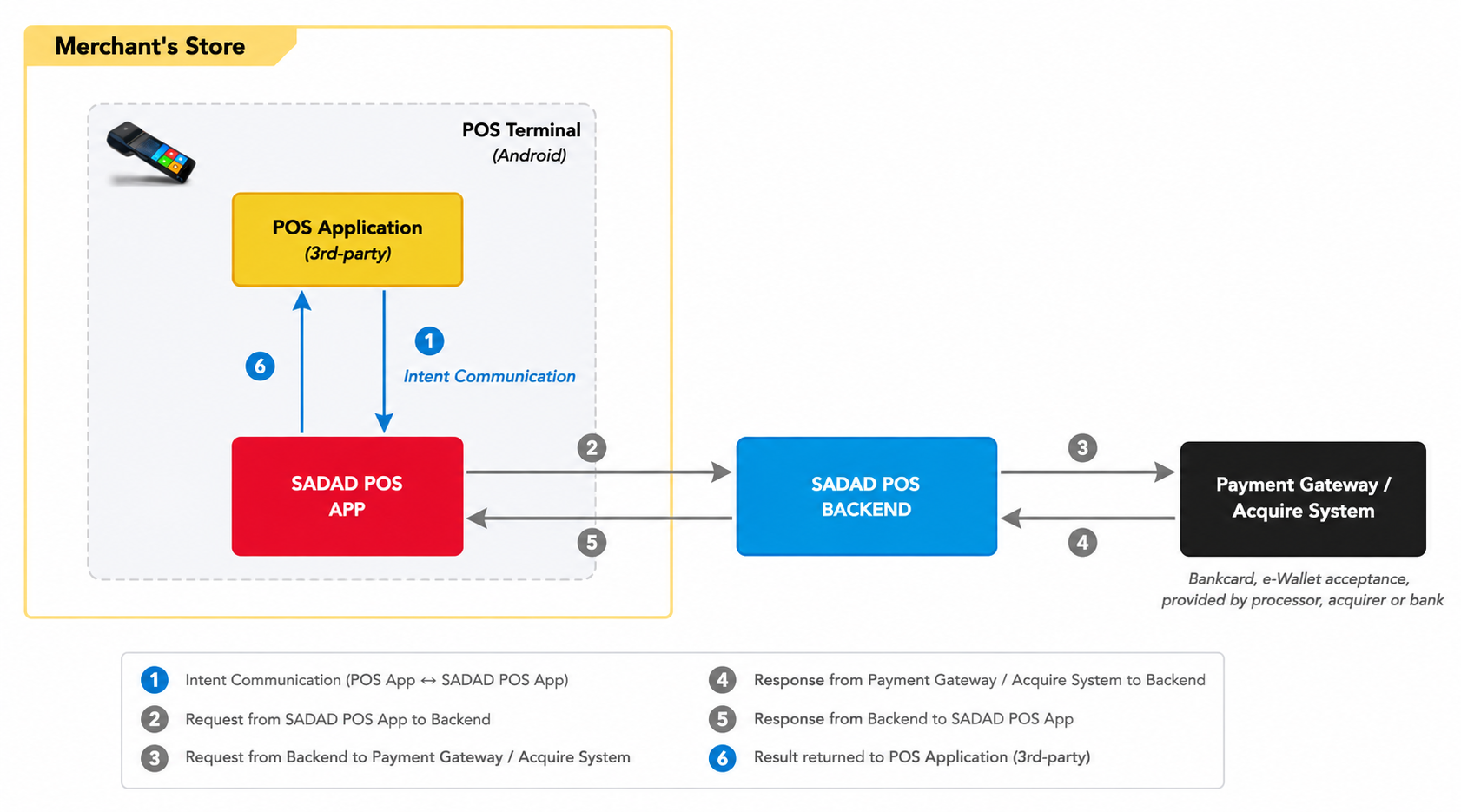
- POS application send order info (include order number, amount) to Sadad POSapp to pull payment checkout component.
- The checkout component of Sadad POScollects the bank card information/mobile wallet user payment voucher and processes it securely, then merges it and order information in the transaction data, and sends the payment request to Sadad switch.
- Sadad switchprocesses the transaction packet and sends to payment gateway or acquire system.
- Payment gateway or acquire system responses result to Sadad switch.
- Sadad switchresponses transaction result to Sadad POSapplication.
- Sadad POSapplication returns transaction result to POS application.
1.2 Integration method
POS application uses Android Intent to interact with Sadad POSapplication. The following diagram shows the interactions between these 2 applications.
- POS application call "startActivityForResult" function to invoke the Sadad POSapplication
- Sadad POSapplication parse the bundle data from POS application and then process transaction
- Then Sadad POSapplication call "setResult" function after the transaction and "finish" own Activity
- POS application received the transaction result by "onActivityResult" event
2. Transaction APIs
Different aspects of each field are defined in this document according to the following conventions.
- M: Required parameters
- C: Required parameters when some conditions are met
- O: Optional parameters
- -: Not Present
2.1 Pre-Init
Pre-initialize the application. This interface can reduce the latency of the first transaction.
| Name | Type | Length | Request | Response | Description |
|---|---|---|---|---|---|
| version | String | - | M | M | API version, fixed value "A01" |
| transType | String | - | M | M | The type code of Sale transaction, fixed value PRE-INIT |
| appId | String | 18 | M | - | The payment app ID registered in SADAD switch |
| loginMode | String | - | O | - | "Login" = need login, default value "LoginFree" = login free |
| userID | String | - | O | - | User ID / Login ID |
| userPassword | String | - | O | - | User password / Login password |
| result | String | - | - | M | Refer to Appendix – Transaction Result Code |
| resultMsg | String | - | - | C | Failure message |
2.2 Purchase/Sale
Sale transaction refers to the payment operation performed by the cardholder when purchasing goods or services from a merchant. The transaction amount is deducted from the cardholder's account and transferred to the merchant's account.
| Name | Type | Length | Request | Response | Description |
|---|---|---|---|---|---|
| version | String | - | M | M | API version, fixed value "A01" |
| transType | String | - | M | M | The type code of Sale transaction, fixed value SALE |
| appId | String | 18 | M | - | The payment app ID registered in SADAD switch |
| loginMode | String | - | O | - | "Login" = need login, default value "LoginFree" = login free |
| userID | String | - | O | - | User ID / Login ID |
| userPassword | String | - | O | - | User password / Login password |
| transData | JSON | - | M | C | Transaction data object |
| result | String | - | - | M | Refer to appendix - Transaction Result Code |
| resultMsg | String | - | - | C | Failure message |
transData field
| Name | Type | Length | Request | Response | Description |
|---|---|---|---|---|---|
| businessOrderNo | String | - | M | M | The order number of the merchant's point of sale application or business system, it must be unique in its system |
| paymentScenario | String | - | M | M | "CARD" – for Card Payment"SCANQR" – Customers scan a code to pay"BSCANQR" – Customers display QR code to pay"CASH" – for Cash Payment |
| paymentMethod | String | - | C | - | Specify a Payment method. This field is mandatory only when paymentScenario is set to "3" or "4". Please refer to Payment Method Section |
| amt | String | 12 | M | M | Order amount. Unit in the smallest denomination of the currency (cents), for example, 1 USD = 100 cents, 1 ZAR = 100 cents, 1 NAD = 100 cents |
| tipAmount | String | 12 | O | O | Tip amount. Unit in the smallest denomination of the currency (cents), for example, 1 USD = 100 cents, 1 ZAR = 100 cents, 1 NAD = 100 cents |
| note | String | 128 | O | - | The order note information |
| notifyUrl | String | 128 | O | - | Service URL for receiving transaction notification webhooks |
| POSMode | String | 1 | O | - | 1 - Integration mode: Automatically closes the Payment App transaction results page2 - Standalone mode: Manually close the Payment App transaction results pageDefault value is 1 |
| onScreenTip | Boolean | - | O | - | Whether or not to enter tips on the Cashier page, default is false |
| transDate | String | 8 | - | M | Transaction date, format: YYYYMMDD |
| transTime | String | 6 | - | M | Transaction time, format: HHMMSS |
| operator | String | 4 | - | O | Operator's work number |
| authCode | String | 6 | - | C | Authentication code. This field returns value when card payment transaction |
| refNo | String | 12 | - | C | Retrieval Reference Number. This field returns value when card payment transaction |
| cardNo | String | 19 | - | C | Card PAN number, masked according to PCI specification. Example: 430277****5723. This field returns value when card payment transaction |
| entryMode | String | 1 | - | O | This field returns value when card payment transaction:1 - Swipe magnetic stripe card2 - Contact chip card3 - Contactless chip card4 - Manual entry input |
| cardHolderName | String | 32 | - | O | Cardholder name |
| transactionID | String | 32 | - | M | The transaction ID of SADAD switch |
| cardType | String | 1 | - | O | Type of bank card:1 - Debit card2 - Credit card |
| vehicleUsage | String | 1 | O | O | Vehicle usage:0 - Private1 - Business |
| odometerReading | String | 6 | O | O | Odometer reading. A maximum of 6-digit integer |
| forecourtData | Array | - | O | - | If the merchant is a gas station, please use this parameter to set specific product information for the gas station. forecourtData is an array, and each element structure can be found in forecourt field. The total sum of forecourtData item amounts must be equal to the order amount amt |
forecourt field
| Name | Type | Length | Request | Response | Description |
|---|---|---|---|---|---|
| code | String | - | M | - | Product Code. Multiple fuel types per transaction are NOT allowed. It is usually a two-digit numeric code, such as 02 |
| quantity | String | - | M | - | Quantity in Litres (3 decimal places). Keep three decimal places, for example: 1.050 |
| amount | String | - | M | - | Amount in cents. An integer in cents, where 1 South African Rand = 100. Its unit is different from amt. Example: 100 |
2.3 Purchase Refund/Purchase Cancellation
Void transaction usually means that within a short period of time after the transaction has been completed, the merchant needs to cancel the transaction for some reason (e.g., merchant error, customer change of mind, etc.).
- The reversal must usually be done on the same day of the transaction and before the batch settlement.
- Upon successful reversal, the original transaction amount will be refunded to the cardholder's account as if the transaction never occurred.
- A reversal usually requires the original transaction voucher or related information for the operation.
A refund transaction is a process in which a cardholder needs to return an item or cancel a service for some reason (e.g., a problem with the item, dissatisfaction with the service, etc.) after the transaction has cleared and requests that the amount paid be returned to the card account.
- The refund may occur on the same day of the transaction, or a few days or more later.
- Refunds usually require the cardholder to provide proof of purchase and a reason for the refund, and the merchant will refund the appropriate amount to the cardholder's card account after reviewing the refund.
| Name | Type | Length | Request | Response | Description |
|---|---|---|---|---|---|
| version | String | - | M | M | API version, fixed value "A01" |
| transType | String | - | M | M | The type code of Void transaction, fixed value REFUND |
| appId | String | 18 | M | - | The payment app ID registered in SADAD switch |
| loginMode | String | - | O | - | "Login" - need login, default value "LoginFree" - login free |
| userID | String | - | O | - | userID / Login ID |
| userPassword | String | - | O | - | userPassword / Login password |
| transData | JSON | - | M | C | Transaction data object |
| result | String | - | - | M | Refer to appendix - Transaction Result Code |
| resultMsg | String | - | - | C | Failure message |
transData field
| Name | Type | Length | Request | Response | Description |
|---|---|---|---|---|---|
| originBusinessOrderNo | String | - | M | - | The order number of the original purchase transaction |
| businessOrderNo | String | - | M | M | The order number of the merchant's point of sale application or business system, it must be unique in its system |
| amt | String | 12 | M | M | Order amount. Unit in the smallest denomination of the currency (cents), for example, 1 USD = 100 cents, 1 ZAR = 100 cents, 1 NAD = 100 cents |
| paymentScenario | String | - | M | - | "CARD" – for Card Payment"SCANQR" – Customers scan a code to pay"BSCANQR" – Customers display QR code to pay"CASH" – for Cash Payment |
| refNo | String | 12 | - | M | Retrieval Reference Number. This field returns value when card payment transaction |
| originTransDate | String | 8 | - | - | Original transaction date, format: YYYYMMDD |
| note | String | 128 | O | - | The order note information |
| notifyUrl | String | 128 | O | - | Service URL for receiving transaction notification webhooks |
| POSMode | String | 1 | O | - | 1 - Integration mode: Automatically closes the Payment App transaction results page2 - Standalone mode: Manually close the Payment App transaction results pageDefault value is 1 |
| paymentMethod | String | - | M | - | Please refer to Payment Method Section |
| transDate | String | 8 | - | M | Transaction date, format: YYYYMMDD |
| transTime | String | 6 | - | M | Transaction time, format: HHMMSS |
| operator | String | 4 | - | O | Operator's work number |
| authCode | String | 6 | - | M | Authentication code. This field returns value when card payment transaction |
| cardIssuer | String | 10 | - | O | Card issuer name |
| cardNo | String | 19 | - | M | Card PAN number, masked according to PCI specification. Example: 430277****5723. This field returns value when card payment transaction |
| entryMode | String | 2 | - | O | This field returns value when card payment transaction:1 - Swipe magnetic stripe card2 - Contact chip card3 - Contactless chip card4 - Manual entry input |
| tipAmount | String | 12 | - | O | Tip amount. Unit in the smallest denomination of the currency (cents), for example, 1 USD = 100 cents, 1 ZAR = 100 cents, 1 NAD = 100 cents |
| transactionID | String | 32 | - | M | The transaction ID of SADAD switch |
2.4 Pre-auth
Pre-auth transactions are a type of card transaction authorization by which a merchant can ensure that the transaction amount is frozen or held in the customer's account until the transaction is completed.
During the authorization stage, the merchant requests authorization from the customer's bank for a specific amount, which is temporarily frozen if the customer has a sufficient available balance or credit limit in their account. This means that the amount is not actually deducted yet, but the customer cannot use the funds for other purchases during this time.
Authorization is commonly used in those situations where the final transaction amount is uncertain, common in lodging service, rental service, unattended self-service, etc.
| Name | Type | Length | Request | Response | Description |
|---|---|---|---|---|---|
| version | String | - | M | M | API version, fixed value "A01" |
| transType | String | - | M | M | The type code of Authorization transaction, fixed value PREAUTH |
| appId | String | 18 | M | - | The payment app ID registered in SADAD switch |
| loginMode | String | - | O | - | "Login" - need login, default value "LoginFree" - login free |
| userID | String | - | O | - | userID / Login ID |
| userPassword | String | - | O | - | userPassword / Login password |
| transData | JSON | - | M | C | Transaction data object |
| result | String | - | - | M | Refer to appendix - Transaction Result Code |
| resultMsg | String | - | - | C | Failure message |
transData field
| Name | Type | Length | Request | Response | Description |
|---|---|---|---|---|---|
| businessOrderNo | String | - | M | M | The order number of the merchant's point of sale application or business system, it must be unique in its system |
| paymentScenario | String | - | M | - | "CARD" – for Card Payment |
| amt | String | 12 | M | M | Order amount. Unit in the smallest denomination of the currency (cents), for example, 1 USD = 100 cents, 1 ZAR = 100 cents, 1 NAD = 100 cents |
| note | String | 128 | O | - | The order note information |
| notifyUrl | String | 128 | O | - | Service URL for receiving transaction notification webhooks |
| POSMode | String | 1 | O | - | 1 - Integration mode: Automatically closes the Payment App transaction results page2 - Standalone mode: Manually close the Payment App transaction results pageDefault value is 1 |
| paymentMethod | String | - | M | - | Please refer to Payment Method Section |
| transDate | String | 8 | - | M | Transaction date, format: YYYYMMDD |
| transTime | String | 6 | - | M | Transaction time, format: HHMMSS |
| operator | String | 4 | - | O | Operator's work number |
| authCode | String | 6 | - | M | Authentication code. This field returns value when card payment transaction |
| cardHolderName | String | 32 | - | O | Cardholder name |
| refNo | String | 12 | - | M | Retrieval Reference Number. This field returns value when card payment transaction |
| cardNo | String | 19 | - | M | Card PAN number, masked according to PCI specification. Example: 430277****5723. This field returns value when card payment transaction |
| entryMode | String | 2 | - | O | This field returns value when card payment transaction:1 - Swipe magnetic stripe card2 - Contact chip card3 - Contactless chip card4 - Manual entry input |
| tipAmount | String | 12 | - | O | Tip amount. Unit in the smallest denomination of the currency (cents), for example, 1 USD = 100 cents, 1 ZAR = 100 cents, 1 NAD = 100 cents |
| cardType | String | 1 | - | O | Type of bank card:1 - Debit card2 - Credit card |
2.5 Pre-auth Completion
Completion transaction is the process of requesting the merchant to formally debit the customer's account for the previously authorized amount after the authorization, when the actual consumption of the service or goods is complete and the final amount is determined. This step is a follow-up to the authorization and ensures that the merchant receives the payment.
For example, when a customer checks out of a hotel at the end of their stay, the hotel will compare the previously authorized amount to the actual amount spent; if the actual amount spent is higher, the hotel will request an additional authorization to cover the difference; if the actual amount spent is lower, only the actual amount spent will be deducted, and the remainder of the authorized amount will be released back to the customer's account.
| Name | Type | Length | Request | Response | Description |
|---|---|---|---|---|---|
| version | String | - | M | M | API version, fixed value "A01" |
| transType | String | - | M | M | The type code of Authorization Completion transaction, fixed value PREAUTHCOMPLETE |
| appId | String | 18 | M | - | The payment app ID registered in SADAD switch |
| loginMode | String | - | O | - | "Login" - need login, default value "LoginFree" - login free |
| userID | String | - | O | - | userID / Login ID |
| userPassword | String | - | O | - | userPassword / Login password |
| transData | JSON | - | M | C | Transaction data object |
| result | String | - | - | M | Refer to appendix - Transaction Result Code |
| resultMsg | String | - | - | C | Failure message |
transData field
| Name | Type | Length | Request | Response | Description |
|---|---|---|---|---|---|
| originBusinessOrderNo | String | 12 | M | - | The order number of the original purchase transaction |
| businessOrderNo | String | - | M | M | The order number of the merchant's point of sale application or business system, it must be unique in its system |
| paymentScenario | String | - | M | - | "CARD" – for Card Payment |
| amt | String | 12 | M | M | Authorization confirmation amount. The final payment amount and any excess authorized amount will be refunded to the customer's account. Unit in the smallest denomination of the currency (cents), for example, 1 USD = 100 cents, 1 ZAR = 100 cents, 1 NAD = 100 cents |
| authCode | String | 6 | - | M | Authentication code. This field returns value when card payment transaction |
| note | String | 128 | O | - | The order note information |
| notifyUrl | String | 128 | O | - | Service URL for receiving transaction notification webhooks |
| POSMode | String | 1 | O | - | 1 - Integration mode: Automatically closes the Payment App transaction results page2 - Standalone mode: Manually close the Payment App transaction results pageDefault value is 1 |
| paymentMethod | String | - | M | - | Please refer to Payment Method Section |
| transDate | String | 8 | - | M | Transaction date, format: YYYYMMDD |
| transTime | String | 6 | - | M | Transaction time, format: HHMMSS |
| operator | String | 4 | - | O | Operator's work number |
| refNo | String | 12 | - | M | Retrieval Reference Number. This field returns value when card payment transaction |
| cardNo | String | 19 | - | M | Card PAN number, masked according to PCI specification. Example: 430277****5723. This field returns value when card payment transaction |
| entryMode | String | 2 | - | O | This field returns value when card payment transaction:1 - Swipe magnetic stripe card2 - Contact chip card3 - Contactless chip card4 - Manual entry input |
| cardIssuer | String | 10 | - | O | Card issuer name |
| tipAmount | String | 12 | - | O | Tip amount. Unit in the smallest denomination of the currency (cents), for example, 1 USD = 100 cents, 1 ZAR = 100 cents, 1 NAD = 100 cents |
2.6 Pre-auth Cancellation
When the pre-authorization transaction is canceled, the frozen funds will be returned to the cardholder's account.
| Name | Type | Length | Request | Response | Description |
|---|---|---|---|---|---|
| version | String | - | M | M | API version, fixed value "A01" |
| transType | String | - | M | M | The type code of Authorization Completion transaction, fixed value PREAUTHCANCEL |
| appId | String | 18 | M | - | The payment app ID registered in SADAD switch |
| loginMode | String | - | O | - | "Login" - need login, default value "LoginFree" - login free |
| userID | String | - | O | - | userID / Login ID |
| userPassword | String | - | O | - | userPassword / Login password |
| transData | JSON | - | M | C | Transaction data object |
| result | String | - | - | M | Refer to appendix Transaction Result Code |
| resultMsg | String | - | - | C | Failure message |
transData field
| Name | Type | Length | Request | Response | Description |
|---|---|---|---|---|---|
| originBusinessOrderNo | String | 12 | M | - | The order number of the original purchase transaction |
| businessOrderNo | String | - | M | M | The order number of the merchant's point of sale application or business system, it must be unique in its system |
| paymentScenario | String | - | M | - | "CARD" – for Card Payment |
| amt | String | 12 | M | M | Authorization confirmation amount, final payment amount, and any excess amount during authorization will be refunded to the customer's account. Unit in the smallest denomination of the currency (cents), for example, 1 USD = 100 cents, 1 ZAR = 100 cents, 1 NAD = 100 cents |
| authCode | String | 6 | - | M | Authentication code. This field returns value when card payment transaction |
| notifyUrl | String | 128 | O | - | Service URL for receiving transaction notification webhooks |
| POSMode | String | 1 | O | - | 1 - Integration mode: Automatically closes the Payment App transaction results page2 - Standalone mode: Manually close the Payment App transaction results pageDefault value is 1 |
| paymentMethod | String | - | M | - | Please refer to Payment Method Section |
| transDate | String | 8 | - | M | Transaction date, format: YYYYMMDD |
| transTime | String | 6 | - | M | Transaction time, format: HHMMSS |
| operator | String | 4 | - | O | Operator's work number |
| refNo | String | 12 | - | M | Retrieval Reference Number. This field returns value when card payment transaction |
| cardNo | String | 19 | - | M | Card PAN number, masked according to PCI specification. Example: 430277****5723. This field returns value when card payment transaction |
| entryMode | String | 2 | - | O | This field returns value when card payment transaction:1 - Swipe magnetic stripe card2 - Contact chip card3 - Contactless chip card4 - Manual entry input |
| cardIssuer | String | 10 | - | O | Card issuer name |
| tipAmount | String | 12 | - | O | Tip amount. Unit in the smallest denomination of the currency (cents), for example, 1 USD = 100 cents, 1 ZAR = 100 cents, 1 NAD = 100 cents |
| version | String | - | M | M | API version, fixed value "A01" |
2.7 Query
Query details of a specified transaction
| Name | Type | Length | Request | Response | Description |
|---|---|---|---|---|---|
| version | String | - | M | M | API version, fixed value "A01" |
| transType | String | - | M | M | The type code of Query transaction, fixed value QUERY |
| appId | String | 18 | M | - | The payment app ID provided by SADAD switch |
| transData | JSON | - | M | C | Transaction data object |
| result | String | - | M | Refer to appendix – Transaction Result code | |
| resultMsg | String | - | C | Failure message |
transData field
| Name | Type | Length | Request | Response | Description |
|---|---|---|---|---|---|
| businessOrderNo | String | - | M | M | The order number of the merchant's point of sale application or business system, it must be unique in its system |
| amt | String | 12 | - | M | Order amount. Unit in the smallest denomination of the currency (cents), for example, 1 USD = 100 cents, 1 ZAR = 100 cents, 1 NAD = 100 cents |
| transDate | String | 8 | - | M | Transaction date, format: YYYYMMDD |
| transTime | String | 6 | - | M | Transaction time, format: HHMMSS |
| operator | String | 4 | - | O | Operator's work number |
| authCode | String | 6 | - | C | Authentication code. This field returns value when card payment transaction |
| refNo | String | 12 | - | C | Retrieval Reference Number. This field returns value when card payment transaction |
| cardNo | String | 19 | - | C | Card PAN number, masked according to PCI specification. Example: 430277****5723. This field returns value when card payment transaction |
| entryMode | String | 2 | - | O | This field returns value when card payment transaction:1 - Swipe magnetic stripe card2 - Contact chip card3 - Contactless chip card4 - Manual entry input |
| tipAmount | String | 12 | - | O | Tip amount. Unit in the smallest denomination of the currency (cents), for example, 1 USD = 100 cents, 1 ZAR = 100 cents, 1 NAD = 100 cents |
| cashAmount | String | 12 | - | O | Cash amount. Unit in the smallest denomination of the currency (cents), for example, 1 USD = 100 cents, 1 ZAR = 100 cents, 1 NAD = 100 cents |
| cardIssuerName | String | 10 | - | O | Card issuer name |
| cardIssuerID | String | 2 | - | O | Card issuer ID |
| cardHolderName | String | 32 | - | O | Cardholder name |
2.8 Print
Reprint the specified transaction. It will be marked "Reprint" in the receipt.
| Name | Type | Length | Request | Response | Description |
|---|---|---|---|---|---|
| version | String | - | M | M | API version, fixed value "A01" |
| transType | String | - | M | M | The type code of Reprint transaction, fixed value PRINT |
| appId | String | 18 | M | - | The payment app ID registered in SADAD switch |
| transData | JSON | - | M | C | Transaction data object |
| result | String | - | - | M | Refer to appendix - Transaction Result Code |
| resultMsg | String | - | - | C | Failure message |
transData field
| Name | Type | Length | Request | Response | Description |
|---|---|---|---|---|---|
| businessOrderNo | String | - | M | - | The order number of the merchant's point of sale application or business system, it must be unique in its system |
3. Sample Code
Intent intent = new Intent();
intent.setAction("com.wiseasy.transaction.call");
intent.putExtra("version", "A01");
intent.putExtra("appId", "yourappid");
intent.putExtra("transType", "SALE");
JSONObject jsonObject = new JSONObject();
try {
    jsonObject.put("businessOrderNo","202202222222");
    jsonObject.put("paymentScenario","CARD");
    jsonObject.put("amt","000000001000");
    intent.putExtra("transData", jsonObject.toString());
} catch (JSONException e) {
    e.printStackTrace();
}
startActivityForResult(intent, 1);
@Override
protected void onActivityResult(int requestCode, int resultCode, Intent data) {
    String result = data.getStringExtra("result");
    String resultMsg =
    data.getStringExtra("resultMsg"); String transData
    = data.getStringExtra("transData"); if
    (result.equals("00")){
        try {
            JSONObject jsonObject = new
            JSONObject(transData); String amount =
            jsonObject.getString("amt");
        }catch(JSONException e){
            e.printStackTrace();
        }
    }
}
4. Appendix
4.1 Transaction result code
| Category | Result Code | Description |
|---|---|---|
| Sucess | 00 | Transaction approved |
Terminal kernel exception | A003 | There is no EMV application in card |
| A008 | Transaction has been rejected | |
| A036 | 2 GAC Failed | |
| A040 | Init SDK failed | |
| C000 | Read card exception | |
| C001 | Swipe card failed | |
| C006 | Card conflict | |
| C008 | IC card not allow swipe first | |
| C009 | Read card timeout | |
| C011 | Track key not found | |
| C014 | Mag-stripe mode contactless transaction not supported | |
| G000 | PinPad exception | |
| G003 | Enter pin canceled | |
| G004 | Enter pin timeout | |
| G005 | Enter pin failed | |
| G006 | Online PIN payments cannot be made without a key in device | |
Package exception | H010 | Mac Error |
| H011 | Signature verification fails | |
Network exception | J000 | Network exception |
| J001 | Can't find host | |
| J002 | Network connection timeout | |
| J003 | Network connect failed | |
| J004 | Send data failed | |
| J005 | Read data failed | |
| J006 | Read data timeout | |
Transaction exception | K018 | Use the same card as the original transaction |
| K019 | No data to be settled | |
| K026 | Manual cancelation by operator | |
| K027 | Transaction timeout | |
| K029 | Low battery! | |
| K036 | Auto Reversal Successful | |
| K037 | Auto Reversal Failed | |
| K039 | Cash back amount exceeds the limit. | |
Third app invoking exception | M002 | Parameter error |
| M003 | Invalid Amount | |
| M007 | This function is not supported now | |
| M008 | The invoke version is incorrect | |
| M009 | Invalid application invoke | |
| M010 | Can`t find original transaction | |
| M011 | The original transaction cannot be void | |
| M012 | The original transaction cannot be canceled. Please ensure that:
| |
| M013 | The original transaction cannot be refund | |
| M016 | Duplicate merchant order number | |
| M017 | Merchant does not support unreferenced refund | |
| M018 | Forecourt parameter is required | |
Server exception | N002 | Sadad switchservice request exception |
| N003 | Acquire service request exception | |
User exception | P001 | Incorrect account or password, please try again |
| P002 | The account is locked and cannot be logged in | |
Init exception | Q001 | System time error, please connect the network to get the time automatically! |
| Q002 | AID is not configured | |
| Q004 | MerchantId or TerminalId is not configured | |
| Q007 | The merchant parameter configuration is incorrect | |
| Q008 | Get Key Info failed | |
Other exception | Z000 | Exception occurred. Further investigation required by technical support |